Understanding the insta360 Camera Features
Key Specifications of the insta360
The insta360 camera series stands out in the realm of action and 360-degree photography with its robust specifications. From high-resolution sensors to versatile shooting capabilities, these cameras are engineered for both enthusiasts and professionals. Key specifications typically include 4K video recording, advanced stabilization technology, and a range of lens options, which contribute to its superior image quality. The compact design makes it portable, ideal for capturing on-the-go adventures without compromising on quality. The impressive battery life allows for extended shooting sessions, ensuring users can seize every moment without interruptions.
Unique Shooting Modes Explained
What sets the insta360 apart is its unique shooting modes, which enhance creative expression. Users can choose from various modes such as 360-degree panoramic shots, time-lapse, and bullet time. The 360-degree mode provides immersive experiences where viewers can freely navigate the scene, making it perfect for virtual reality applications. The time-lapse mode compresses hours of activity into a few minutes, capturing dynamic scenes such as sunrises or bustling cityscapes. Bullet time, on the other hand, allows users to creatively capture fast-moving subjects while giving an illusion of time slowing down. Understanding these modes can significantly enhance the storytelling capability of your footage.
How to Navigate the User Interface
Navigating the user interface of the insta360 can be straightforward once users familiarize themselves with its layout. The touchscreen display allows for intuitive navigation through settings and modes. Users can easily switch between shooting styles or access settings such as resolution and frame rates. Additionally, the camera often features companion apps which extend functionality by providing advanced editing tools, sharing options, and even live streaming capabilities. Familiarity with these elements not only enhances shooting efficiency but also maximizes the creative potential of the camera.
Creative Techniques for Stunning Visuals
Using Timelapse for Dynamic Scenes
Timelapse photography is a compelling way to tell a story, especially with the capabilities of the insta360. It allows users to capture changes in dynamic scenes over extended periods. For instance, setting the camera on a tripod to film a landscape as day transitions into night can produce breathtaking results. To maximize effectiveness, consider timing the shoot for events like sunset or busy city life, where movement and change are prominent. Experimenting with different intervals, such as one-second or five-second setups, can yield varied results in the final edit.
Panning and Movement Techniques
Panning is an essential technique that can transform footage from ordinary to extraordinary, particularly in action shots. By smoothly moving the camera along with a moving subject, you can create a sense of speed and excitement. The insta360's stabilization technology aids in achieving seamless pans, even during fast action sequences. Practicing the timing of your pan—starting and ending at the right moments—can drastically improve the quality of your footage. Additionally, using slow and steady movements can lead to captivating results, particularly in scenes with intricate details.
Incorporating Slow Motion Effects
Slow motion is another powerful tool in visual storytelling. The insta360 cameras allow for high frame rate recording suitable for achieving stunning slow-motion effects. By slowing down fast action scenes, such as someone jumping off a cliff, you can add dramatic flair and detail which the human eye might otherwise miss. When utilizing this feature, choosing the right scene and ensuring adequate lighting can greatly enhance the final output. Always remember to maintain a steady hand or use a stabilizer for the best effect.
Post-Production Tips for Enhanced Footage
Editing Tools Optimal for insta360 Content
Post-production is where the magic happens. Using software optimized for 360 content, like insta360 Studio or other advanced editing tools, allows for extensive creativity in enhancing footage. Key functionalities include adjusting the field of view, stitching together the 360 footage seamlessly, and applying effects that can make your clips pop. Users can also manage audio tracks, overlay graphics and text, and manipulate colors to evoke specific emotions. The editing process is crucial, as it can refine raw footage into a professional-grade film ready for sharing.
Color Grading for a Professional Finish
Color grading is the art of enhancing and altering color in your footage through software. It can significantly transform the mood of a scene. For instance, a bright, vibrant look can evoke feelings of joy and excitement, while darker, desaturated colors can establish a sense of drama. Insta360 users can utilize software tools that offer LUTs (Look-Up Tables) specifically designed for 360 videos, allowing for quick professional-level adjustments. Explore various color grading techniques like teal and orange, or monochrome styles to find the one that best fits your storytelling approach.
Sound Design: Adding the Right Atmosphere
Sound design adds a crucial layer to video production. When editing, consider the audio elements that complement your visuals—background music, narration, or nature sounds. Sound effects can help evoke emotions, such as the rush of wind during a dramatic cliff jump. Utilize royalty-free sound libraries for quality audio options, ensuring that they align well with the visual storytelling. Appropriate sound design keeps the audience engaged and enhances overall immersion, making them feel part of the experience.
Sharing Your insta360 Content Effectively
Best Platforms for Sharing Video Content
Choosing the right platform for sharing your insta360 content can influence its reach and engagement. YouTube stands as a popular hub for 360 videos, equipped with integrated support for interactive formats. Instagram also supports 360 photos and short clips, appealing to users seeking visually striking content. Facebook is another viable platform, allowing for direct sharing of 360 videos to reach broader audiences. Deploying each platform’s features effectively can significantly enhance visibility and interaction with your content.
Engaging Your Audience through Social Media
Social media is a powerful avenue for engagement. Developing a strategy that includes regular updates, behind-the-scenes content, and interactive posts can build community and prompt audience interaction. Stories and live sessions can also boost engagement levels by making followers feel involved in the process. Create posts that encourage comments or sharing to increase visibility. Engaging with followers in comments increases trust and makes them more likely to engage with future posts.
SEO Tips for Video Content Visibility
Search engine optimization (SEO) is essential for ensuring that your video content is discovered. Start by optimizing titles and descriptions with relevant keywords, ensuring they mirror what potential viewers might search for. Incorporate tags related to your content for additional discoverability. Creating shorter, engaging clips to share in blogs or social media can funnel traffic to the longer-form video versions. Finally, having a dedicated landing page for your video content enhances overall visibility while offering viewers a hub to access related projects.
Common Challenges and Solutions with insta360
Troubleshooting Common Issues
Like any device, users may encounter challenges when using the insta360. Common issues include connection problems with smartphones or slow processing times during editing. Regular software updates can remedy connectivity problems, while optimizing the camera settings to match your specific shooting environment can enhance performance. When issues arise, consult online forums or support resources where fellow users share solutions. Understanding the functionality of your device and keeping it updated is crucial for an optimal shooting experience.
Adapting to Different Environments
Adapting your shooting technique to various environments ensures better footage quality. Low-light conditions often require adjustments in ISO settings to minimize grainy appearances or using additional lighting sources. Additionally, windy conditions can impact sound quality; utilize windshields or other sound dampening techniques. Practice and familiarity with the camera's capabilities in diverse scenarios will enhance adaptability and results, allowing users to achieve high-quality content regardless of environmental conditions.
Maintaining Your insta360 Device
To extend the lifespan of your insta360, proper maintenance is key. Regularly cleaning the lenses and ensuring the camera is free from dust and debris will maintain optimal performance. Store the camera in a protective case when not in use to avoid physical damage. Additionally, monitoring battery health and replacing it as necessary, along with routine software updates, will enhance performance. Being proactive in maintenance helps avoid potential issues, ensuring your camera is always ready for the next great shot.
FAQs
What resolutions are available with the insta360 cameras?
The insta360 offers various resolutions, typically reaching up to 4K for video, which ensures high-quality images and smooth playback.
Can I edit insta360 footage on my phone?
Yes! The insta360 app allows you to edit footage directly on your mobile device, providing intuitive tools for easy editing and sharing.
Is the insta360 waterproof?
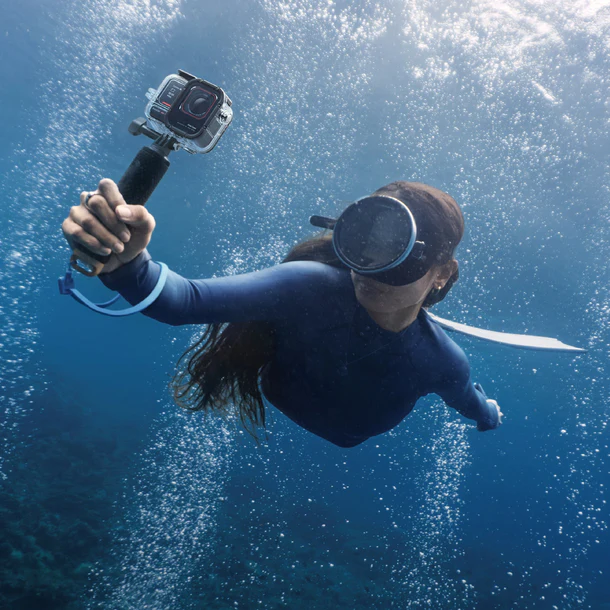
Many insta360 models are water-resistant or come with optional waterproof cases, making them suitable for aquatic adventures.
What is the battery life like on the insta360?
The battery life varies by model, but generally, users can expect several hours of filming on a single charge, depending on usage.
How do I share my insta360 videos online?
You can share your videos directly through the app, which provides options for uploading to platforms like YouTube, Instagram, and Facebook seamlessly.